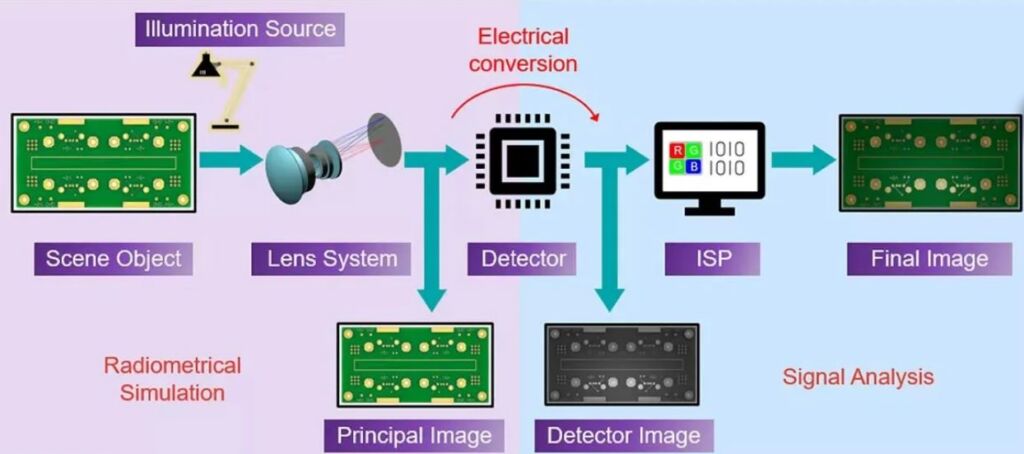
Modelling a machine vision system involves simulating the entire imaging process, from the scene object to the final image. This includes:
- Scene definition: The object or environment being imaged, such as a printed circuit board (PCB) or a conveyor belt of products.
- Lighting setup: The type, position, and intensity of light sources, which affect image quality and visibility of features.
- Optical system: The lens and sensor configuration, which determine how light is captured and converted into an image.
- Image Signal Processing (ISP): Algorithms that process raw sensor data into a usable image, such as red, green, blue (RGB) or greyscale, and perform automatic grading of the item in the resultant image.
By creating a virtual prototype of the system, engineers can test different configurations, identify potential issues, and optimize performance before building a physical prototype. This approach saves time and reduces costs, making it an essential step in the design process.
Modelling the optical system
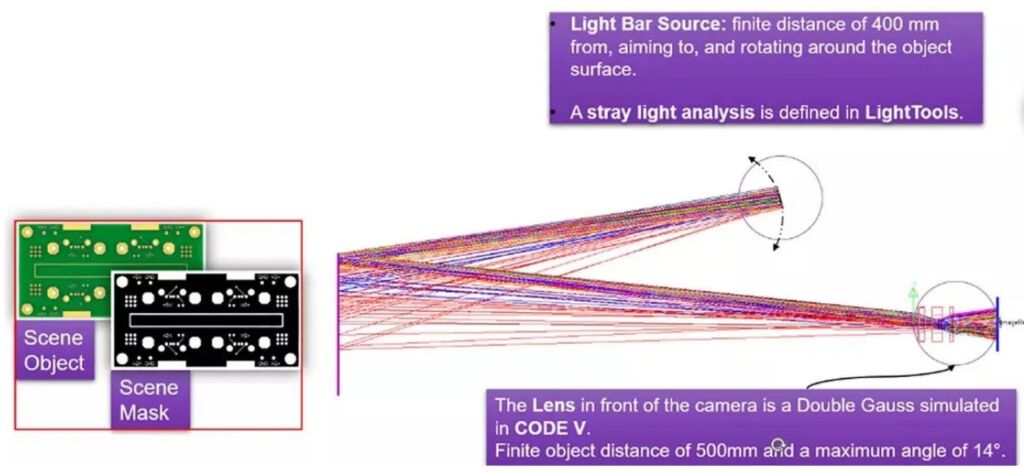
Description of the Optical System ImSym provides a unified simulation environment for designing and testing optical systems. For example, in a machine vision system designed to inspect PCBs, the optical system includes a scene object, such as a PCB illuminated under ambient light or additional light sources, a lens system, which focuses light from the scene onto the sensor and a sensor, which converts light into electronic signals for further processing. The simulation tool integrates seamlessly with Code V and LightTools, enabling accurate radiometric simulations and optical modelling. Engineers can import lens designs, define sensor properties, and simulate the entire optical system within a single platform.
Image simulation constraints with specular reflection
ImSym simulates the light rays traveling through the optical system, from the scene to the sensor. This includes:
- Radiometric image generation: Calculating the spectral irradiance distribution at the sensor.
- Electronic conversion: Simulating the conversion of incident photons into digital numbers at the output of the sensor.
- Image processing: Applying default or custom internet service providers (ISPs) to produce a final image, such as an RGB or greyscale output, as well as perform ISP functions like detection or grading.
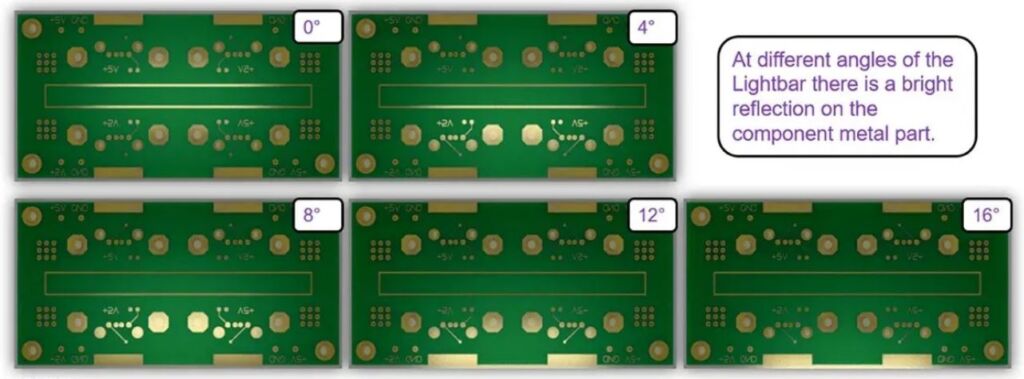
For example, in a PCB inspection system, the tool can simulate how ambient lighting and a light bar affect the visibility of holes in the PCB. By adjusting parameters such as lighting angle or sensor settings, engineers can optimize the system for better detection accuracy.
Constraints with specular reflection
Another challenge is specular reflection, where light reflects off shiny surfaces and saturates the sensor. This can obscure critical features, such as holes in a PCB. ImSym allows engineers to simulate these effects and test different solutions, such as adjusting the position or type of light source to minimize reflections, modifying the sensor’s exposure settings to handle high-intensity light or improving detection algorithms to account for missing or obscured features. For example, a simulation might reveal that certain lighting angles cause specular reflections that obscure some holes in a PCB. By testing alternative lighting setups in ImSym, engineers can identify the optimal configuration without the need for costly physical prototypes.